


Reconciling corporate credit cards in NetSuite can get complicated fast. Multiple cardholders. Shared GL accounts. Segmentation requirements across departments. Statement dates that never line up with your close calendar. And native NetSuite reconciliation tools that were designed primarily for bank accounts, not credit card programs.
This guide walks through the step-by-step process for NetSuite credit card reconciliation using NetCash by Netgain, a NetSuite-native reconciliation tool built for both bank and credit card accounts. We will also cover what makes credit card reconciliation different from bank reconciliation, the challenges that slow teams down, and the best practices that help you close faster.
A quick intro to NetCash
NetCash is a NetSuite-native SuiteApp by Netgain that handles bank and credit card reconciliations inside NetSuite. It gives accounting teams a dedicated workspace for importing statement data, matching transactions, building automation rules, and reconciling balances, all without leaving the ERP.
Credit card reconciliation is available as an add-on module to NetCash. It uses the same interface and workflows you would use for bank reconciliation, so if you are already reconciling bank accounts in NetCash, the credit card process will feel familiar from day one.

Why credit card reconciliation in NetSuite is harder than bank reconciliation
Before we get into the steps, it helps to understand why credit cards need their own playbook. If you have a solid bank reconciliation process, the general workflow will feel familiar: import data, match transactions, investigate discrepancies, and reconcile the balance. But credit cards introduce wrinkles that bank accounts do not.
Multiple cards, one GL account
It is common for organizations to map several corporate credit cards to a single Credit Card GL account. Five employees might each have their own card, but all five post to the same account in the chart of accounts. Reconciling that balance accurately requires a tool that can aggregate across cards and show you the combined picture in one view.
Statement timing
Credit card statements rarely close on the last day of the month. A statement closing on the 22nd will include charges you have not yet recorded and will miss charges from the 23rd through month-end. This creates a steady stream of timing differences that need to be tracked as outstanding items each period.
Sign conventions
Bank reconciliations deal in outstanding checks and deposits in transit. Credit cards use different conventions. Charges increase a liability (they show as positive amounts in NetCash), while payments and refunds decrease it (negative amounts). Credit card reconciliations also surface outstanding charges and outstanding payments instead of outstanding checks and deposits. If your reconciliation tool does not adapt its terminology and sign handling for credit cards, the numbers get confusing.
Segmentation across cardholders
Every credit card transaction needs the right department, class, location, or other segment values before it hits the GL. When dozens of employees are making purchases across different cost centers, segmentation errors become the most common source of reconciliation problems downstream.
How to reconcile credit cards in NetSuite with NetCash: step by step

Step 1: Set up your credit card accounts in NetCash
Credit card accounts are created the same way you create bank accounts in NetCash. Both are referred to as "NetCash Bank Accounts" in the system. The difference is determined by the GL account type: if the GL account mapped to a NetCash Bank Account has the Credit Card account type, NetCash automatically treats it as a credit card account.
A few things to configure during setup:
- Parent and child accounts. If you have a corporate card with individual employee cards underneath, set up a parent account with default segment values (department, class, location) and create child accounts that inherit those preferences. Any child account without its own override will use the parent's defaults. This keeps segmentation consistent across your entire card program without requiring manual entry on every transaction.
- Employee assignment. Add the cardholder to each NetCash Bank Account record to track which employee each card belongs to. This improves audit trails and makes it easier to investigate discrepancies later.
- Custom fields and segments. Add any additional fields you need on the credit card account record, like cost center or project code. You can also add custom fields to transaction records. For example, if your expense management system provides receipt URLs, you can include those on each journal entry NetCash creates.
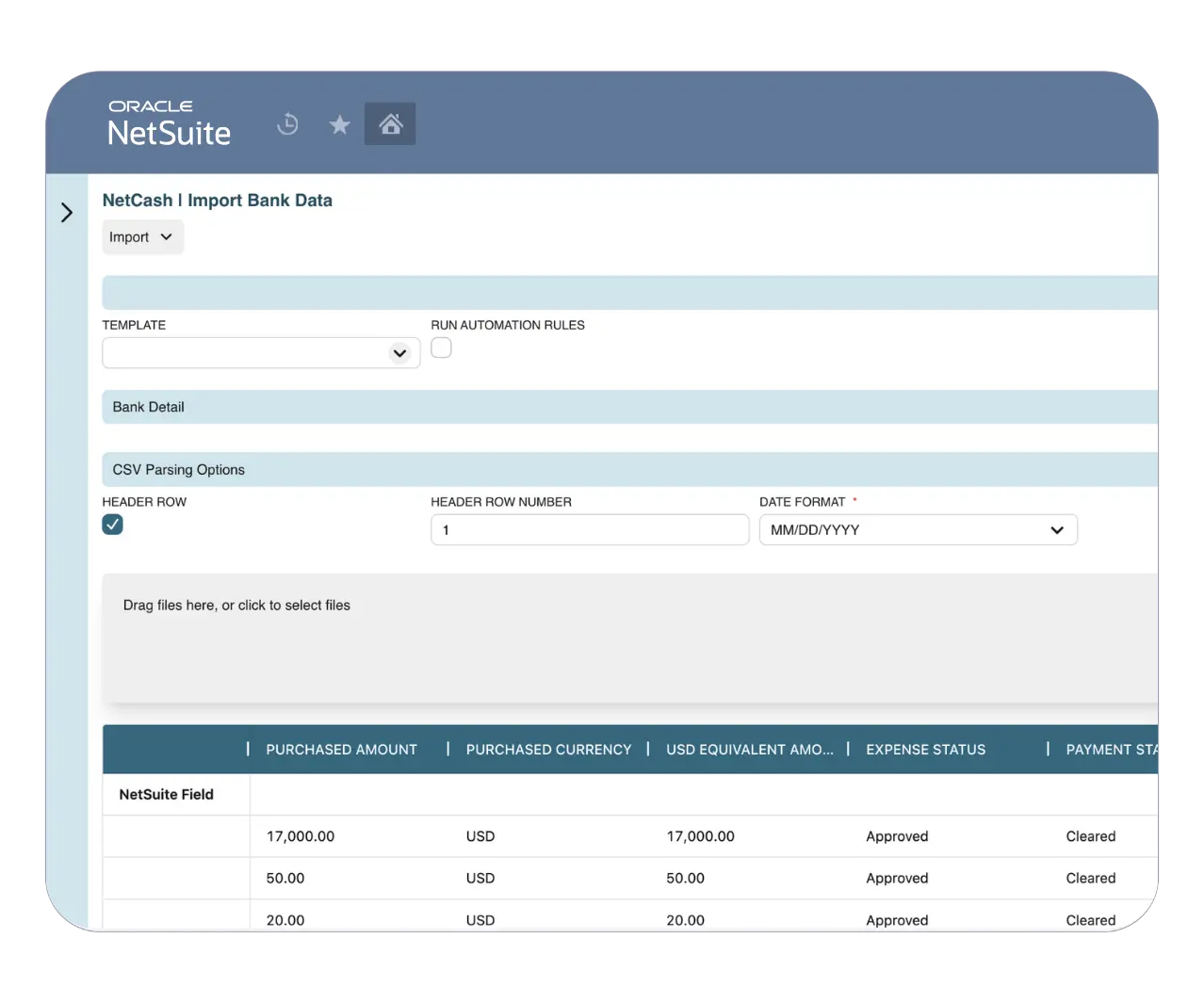
Step 2: Import credit card transactions
Bring your credit card statement data into NetCash. You have two options:
- CSV import: Upload your credit card statement using a custom template built for your card provider's format. NetCash supports custom CSV templates so you can standardize the import process and avoid reformatting statements every month.
- API connection: If your card provider integrates with Plaid, NetCash can pull transactions in automatically.
Either way, the imported transactions appear in NetCash alongside your GL data, ready for matching.
Step 3: Match transactions
This is where the bulk of the work happens. On the NetCash Manual Match page, credit card charges appear as positive transactions (increases to the card balance) and payments and refunds appear as negative transactions. This follows credit card conventions rather than bank conventions, so the numbers make sense in context.
NetCash gives you the full matching toolkit:
- GL Match: Match imported credit card transactions directly to existing GL entries.
- Cash Application: Apply transactions against open balances.
- Create Transaction: Generate a new journal entry directly from an imported line when no GL entry exists yet.
- Create Transfer: Record balance payments as transfers between your bank account and credit card account.
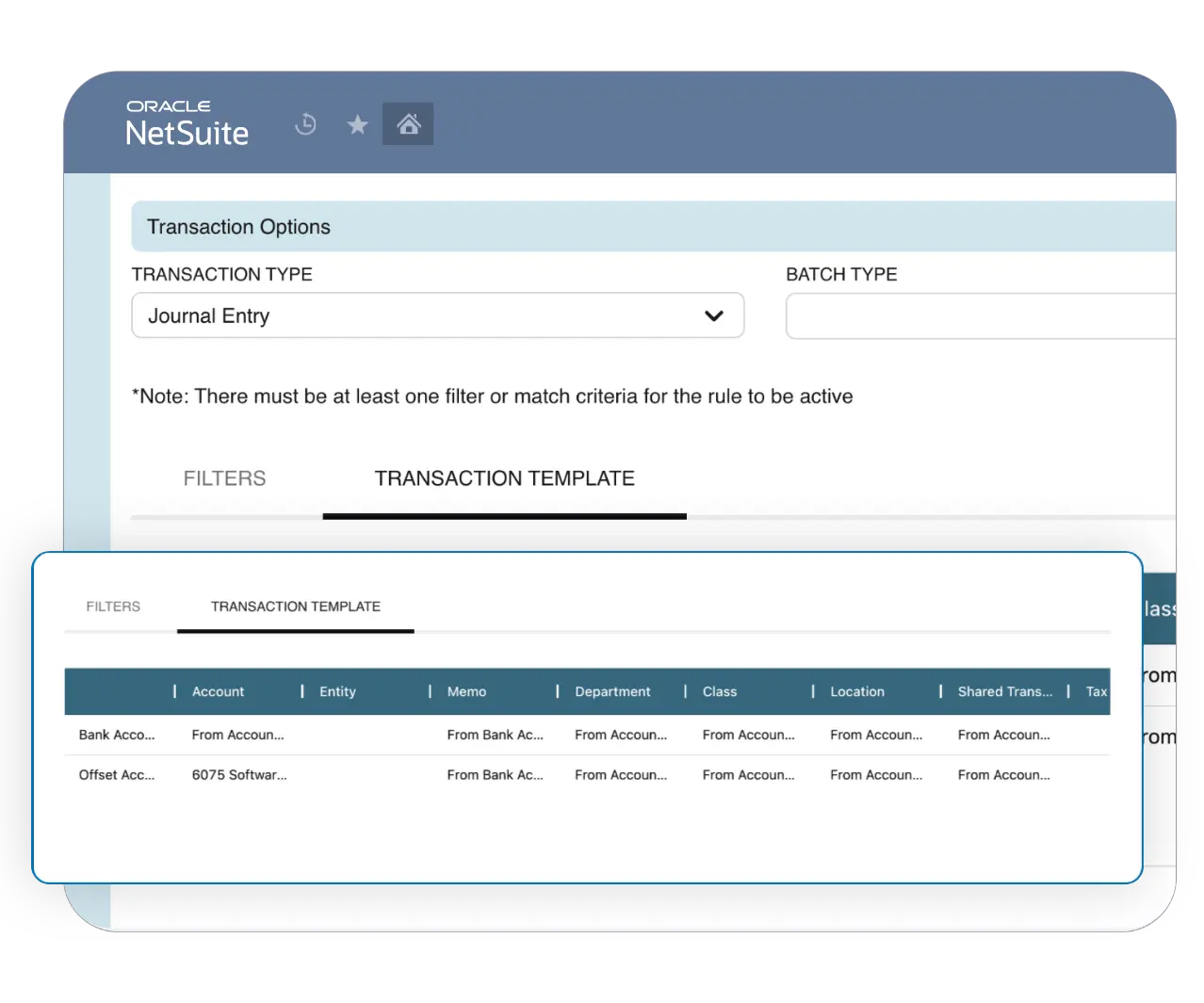
On top of manual matching, you can build automation rules that handle recurring patterns without any manual intervention. Subscriptions, standard vendor charges, and other predictable transactions can be matched, categorized, and journaled automatically. Credit card accounts can share automation rule groups with other credit card accounts or with bank accounts, so you do not have to rebuild rules from scratch.
Step 4: Handle credit card balance payments
When your company pays off a credit card balance (partially or in full), NetCash treats it as a bank transfer. On the Manual Match page, select the Bank Transfers screen. Choose the credit card account on one side and the bank account used for payment on the other.
One thing to note: unlike a transfer between two bank accounts, both sides of a credit card balance payment will show negative signs. This is expected behavior. The bank account balance decreases (cash going out) and the credit card balance decreases (liability going down). NetCash handles this correctly so you do not need to adjust anything manually.
Step 5: Review outstanding items
After matching, review what remains. Credit card reconciliations use different terminology than bank reconciliations:
- Outstanding charges: GL transactions that have been recorded but not yet matched to an imported credit card transaction.
- Outstanding payments: Payments recorded in the GL that have not yet appeared on the credit card statement.
NetCash automatically surfaces these items on the Reconcile page. Make sure you carry forward outstanding items from the prior period and confirm they clear in the current one. Items that linger month after month are a red flag worth investigating.
Step 6: Reconcile the balance
This is where multi-card reconciliation comes in. When you select a Credit Card GL account on the NetCash Reconcile page, NetCash automatically displays the total balance across all credit card accounts linked to it. You can reconcile one card to one GL account, or multiple cards to one GL account, all in a single view.
Confirm the ending balance on your credit card statement matches the reconciled balance in NetCash. If there is a difference, investigate. Common culprits include missed transactions, duplicate entries, incorrect amounts, and outstanding items that were not properly carried forward from the prior period.
When the balance ties, finalize the reconciliation. And unlike some tools that lock you into a month-end schedule, NetCash lets you reconcile any day of the month.
Best practices for faster credit card reconciliation
- Match more frequently. Do not wait until month-end to touch your credit card accounts. A quick weekly review catches issues early and makes the final reconciliation much lighter.
- Set segmentation defaults at the parent level. Configure department, class, and location defaults on the parent credit card account. Child accounts inherit them automatically, and you can override at the child level when needed. This prevents the most common source of reconciliation errors.
- Build automation rules for recurring charges. Subscriptions, standard vendor payments, and other predictable transactions are ideal candidates. Let NetCash match and journal them automatically so your team focuses on the exceptions, not the routine.
- Standardize your CSV import templates. Create a template for each card provider's statement format. Consistent formatting reduces import errors and speeds up matching.
- Track outstanding items rigorously. Carry forward outstanding charges and payments from each period. Confirm they clear in subsequent periods. Unresolved items compound quickly and make future reconciliations harder.
- Use employee assignment for accountability. Assigning a cardholder to each credit card account makes it easier to chase down documentation, investigate discrepancies, and maintain a clean audit trail.
Get started with credit card reconciliation in NetCash
Already using NetCash for bank reconciliation?
The Credit Card Reconciliation module extends everything you already use in NetCash to your corporate card program. Same interface, same automation rules, same matching tools. It is available as a paid add-on.
New to NetCash?
NetCash handles both bank and credit card reconciliations natively inside NetSuite. No spreadsheets, no external tools, no data leaving your ERP.
See credit card reconciliation in action.
Frequently Asked Questions
What is credit card reconciliation?
Credit card reconciliation is the process of comparing the transactions on your corporate credit card statement to the entries recorded in your general ledger. The goal is to confirm that every charge, payment, and credit on the statement has a matching, correctly categorized entry in your books.
This process matters for several reasons. Unreconciled credit card transactions can distort your financial statements, create issues during audit, and leave you with an inaccurate picture of your liabilities. Unlike a bank account where the balance reflects cash on hand, a credit card balance represents what you owe. If your GL does not match the statement, you may be understating or overstating that liability.
Most companies reconcile credit cards monthly as part of the month-end close, with additional reviews at the end of each quarter and a more thorough reconciliation at year-end.
There are two sides to credit card reconciliation:
- Expense reconciliation: Verifying that purchases made on corporate credit cards match the corresponding entries in your GL. This is the type of reconciliation most accounting teams are focused on and the process this article covers.
- Merchant reconciliation: Verifying that credit card payments received from customers through a payment processor (like Stripe or PayPal) match the deposits in your bank account. This is a separate process typically handled alongside accounts receivable.
Why does credit card reconciliation matter?
- Financial accuracy. Credit card transactions that are missing, duplicated, or miscategorized in the GL will flow through to your financial statements. Reconciliation catches these errors before they become bigger problems.
- Fraud detection. Regular reconciliation helps surface unauthorized charges, duplicate transactions, and other suspicious activity on corporate cards.
- Cash flow visibility. Credit card balances represent a liability. If you are not reconciling regularly, you may not have an accurate picture of what you owe, which can lead to poor cash flow decisions.
- Audit readiness. Clean, documented reconciliations make the audit process smoother and demonstrate strong internal controls.
- Faster close. The more frequently and consistently you reconcile credit cards, the less work piles up at month-end. Teams that reconcile weekly often find their month-end close is significantly faster.