NetAsset Add-On module
Alternate depreciation schedules for NetSuite
Your team needs different depreciation reports from the same asset list, and spreadsheets aren't cutting it.
NetAsset's Tax and Alternate Schedules add-on lets you maintain up to 10 alternate depreciation schedules per asset record without leaving NetSuite.












Common asset tracking challenges
As organizations grow, so does the complexity of asset depreciation. Different stakeholders need different numbers from the same physical asset list, and native NetSuite tools were not built to handle that kind of dual tracking. These challenges surface in several ways.
The benefits of NetAsset's
Tax & Alt Depreciation Schedules
The Tax and Alternate Schedules add-on extends the NetAsset you already know. No new interface to learn and no data leaving NetSuite. You get secondary depreciation tracking built directly into the asset records your team works with every day.

Up to 10 schedules
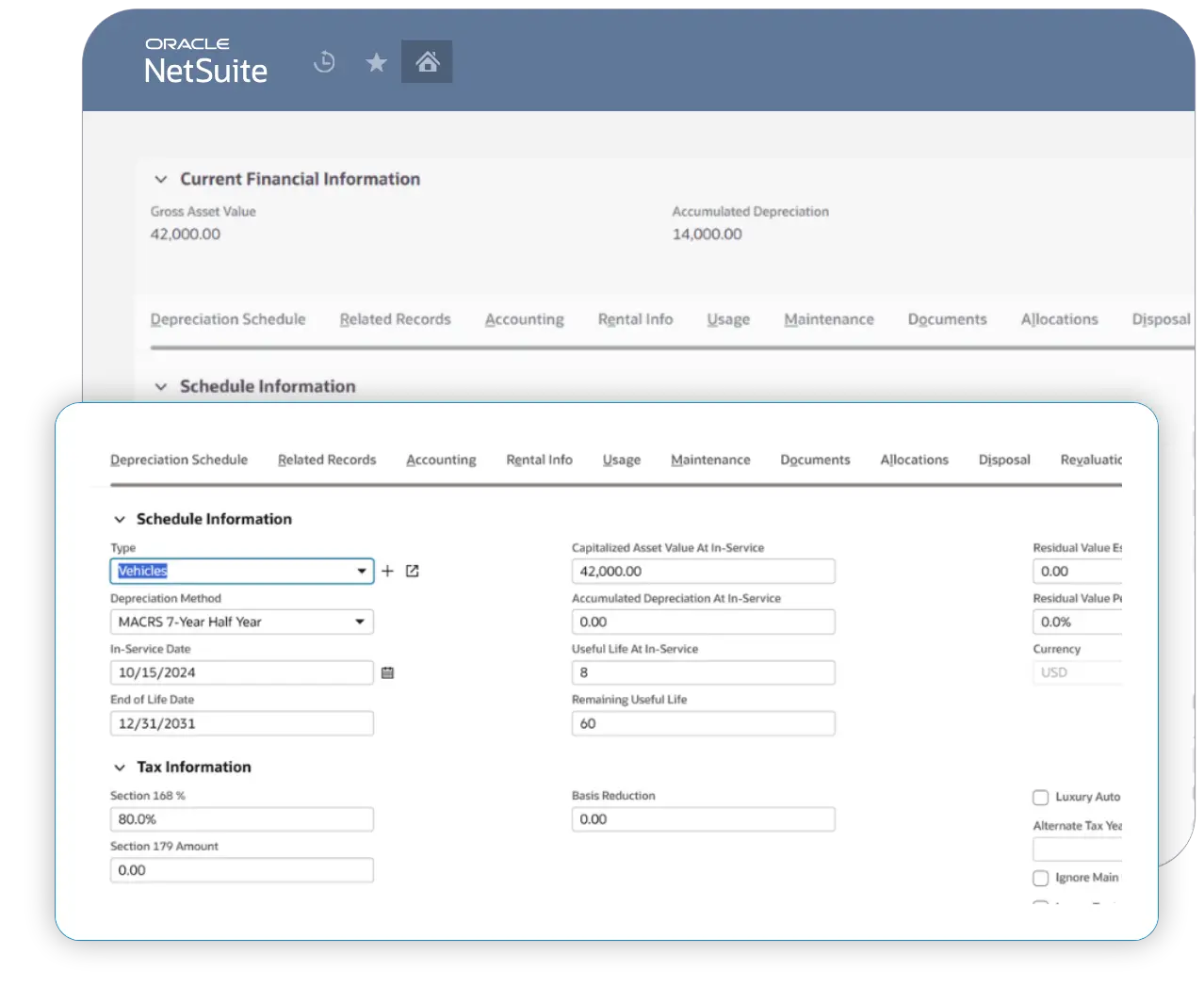
Maintain up to 10 alternate depreciation schedules per asset, all on a single record. Whether you need a tax schedule or a local statutory schedule, they all live alongside your primary book without duplication.
Asset-level control
Override any field at the individual asset level rather than being locked into type-driven defaults. If one asset in a category needs a different useful life, method, or starting value, change it on that record without affecting everything else in the type.

Auto-generated schedules
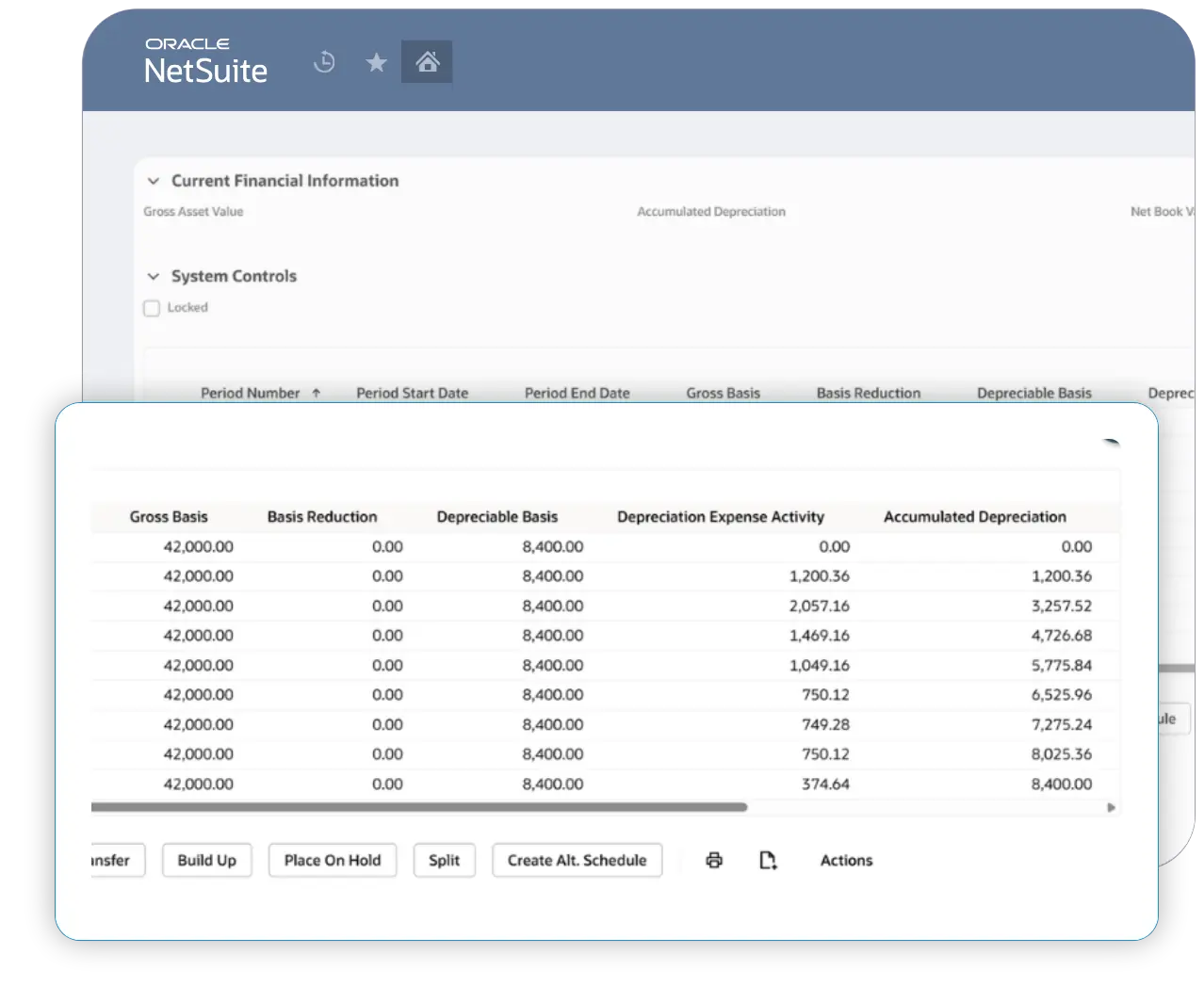
When you create an alternate schedule, NetAsset generates the full secondary depreciation schedule up front. See projected depreciation across future periods for planning, budgeting, and audit preparation instead of waiting for values to calculate period by period.
Automated disposals
Dispose of an asset on the primary schedule and the corresponding alternate schedules update automatically. Buildups flow through the same way. No manual re-entry across schedules to keep everything in sync.

Unified Reporting
The Waterfall, Subledger Roll Forward, and Register reports include a schedule filter, so primary and alternate depreciation data live in one interface. Toggle between schedules to deliver what each stakeholder needs without switching tools.
Explore alternate scheduels
See how the Tax and Alternate Schedules add-on fits into your current NetAsset workflows. Walk through creating a secondary schedule, reviewing projected depreciation, and filtering reports by book.
See why Netgain is trusted by accounting and operational teams
98%
Customer retention rate
9 out of 10
Clients would recommend Netgain
Assurance
Through bi-annual SOC reports
500+
Companies rely on NetAsset
Why choose NetAsset Tax and Alternate Scheduels
Explore the features of Netgain's alternate depreciation software

Individual asset record overrides
Every field on an alternate schedule can be overridden at the individual asset level. Change the asset value, depreciation method, useful life, or start date for a single asset without modifying the type-level defaults. This is a core differentiator from legacy systems, where alternate schedule behavior is type-driven and limited to a small set of override fields.
Full forward-looking schedule generation
Tax and Alternate Schedules generate a complete, forward-looking depreciation projection across all future periods, not just the current one. Whether you're modeling a different useful life, method, or residual value assumption, you get full visibility into how the asset depreciates under that scenario from the moment you run it, with no need to wait for periods to close and post.
CSV import and asset type defaulting
Scale without the manual work. CSV import lets you populate alternate schedule parameters across your entire asset population in one pass. Prefer a set-it-and-forget-it approach? Configure defaults on your asset types and every new asset inherits the right alternate schedule settings automatically.
Automated cross-schedule transactions
Disposals and buildups on the primary schedule automatically flow through to all associated alternate schedules. When you dispose of an asset on your primary book, the alternate schedules reflect that event without requiring separate manual entries.
Schedule-filtered reporting
Waterfall, Subledger Roll Forward, and Register NetAsset reports support filtering by schedule. Flip between your primary and alternate schedules to generate the depreciation data each stakeholder needs from a single reporting interface.
Your business operates at an impressive scale — and that deserves a more personalized approach. Because of the complexity and impact of managing a close process with over 50 employees, a simple ROI calculation wouldn't capture the full value you can gain. One of our experts will reach out shortly to provide tailored insights and discuss how we can help you achieve a faster, more efficient close.
Want to get ahead? Schedule time with one of our experts now.
Schedule a call with usYour close process is cost efficient, but there’s more to gain!
By automating your month-end close, you’ll:
Save time: Free up hours for more strategic, high-impact work.
Reduce errors: Increase accuracy and confidence in your reports.
Boost team efficiency: Simplify workflows and minimize manual tasks.
Schedule a demo to explore the full value Netgain brings to your team.
Current State
960
hours Spent per year
$453,200
dollars SPENT per year
180% ROI
$10,080
saved per period
$125,960
annualized savings
288
hours saved per year
180%
netclose roi
Your team can save 288 hours with Netgain. Unlock your detailed report below.
Simplify
multi-basis asset depreciation
Stop maintaining parallel spreadsheets and reconciling across disconnected systems. With Tax and Alternate Schedules built directly into NetAsset, your team tracks every depreciation basis on a single asset record inside NetSuite.
NetAsset resources



Alternate depreciation schedule software FAQs
No. Multibook Posting and Tax Complete will include Tax and Alternate Schedules as part of the purchase price and it does not need to be purchased separately. The Multibook Posting and Tax Complete add-ons add additional automation on top of the existing Tax and Alternate Schedule functionality. Tax and Alternate Schedules is meant as a lighter functionality option before going with a more robust, targeted solution.
Tax and Alternate Schedules is an add-on module for NetAsset that lets you maintain up to 10 secondary depreciation schedules on each asset record. It was built to solve the common problem of tracking the same physical asset under different depreciation methods, useful lives, or valuations for purposes like tax reporting, local statutory requirements, or partner-basis accounting. The module has been available for over five years and has been refined through hundreds of client implementations.
A depreciation schedule is a table or record that tracks how an asset loses value over time. It includes the asset's original cost, depreciation method (e.g., straight-line or declining balance), useful life, and the calculated depreciation expense for each period. Accounting teams use depreciation schedules to allocate asset costs accurately across reporting periods and to support financial statements, tax filings, and audits.
A depreciation schedule reflects the primary set of depreciation values your organization records on its books, typically following GAAP or your primary accounting standard. An alternate depreciation schedule is a secondary schedule maintained on the same asset using different assumptions, such as a different method, useful life, or cost basis. Organizations use alternate schedules when different stakeholders need different numbers from the same asset, for example, your GAAP books may use straight-line over 10 years while your tax team needs MACRS over 5 years.
No, Tax and Alternate Schedules is a paid add-on to NetAsset. It is priced as a percentage of your NetAsset license, which is usage-based. However, if you purchase Multibook Posting or Tax Complete, Tax and Alternate Schedules is included at no additional cost because both of those modules are built on top of it.
You enable alternate schedules in the NetAsset system setup, then configure secondary schedules on individual asset records or by defaulting values from asset types. NetAsset copies your primary asset information into the alternate schedule and lets you override any field, including depreciation method, useful life, residual value, and start date. The full secondary depreciation schedule is generated so you can see projected values across future periods.
Yes. Tax depreciation is the most common use case. You can enable tax-specific settings at no extra charge, which adds fields for Section 168, Section 179 bonus depreciation, and luxury auto vehicles. For full tax automation including auto-populated methods based on tax rules, you would need the Tax Complete add-on, which includes Tax and Alternate Schedules.
Fixed Asset Management (FAM) supports alternate schedules, but its approach is type-driven, meaning configuration applies at the asset type level with limited field overrides on individual records. NetAsset's Tax and Alternate Schedules is asset-driven, letting you override essentially any field at the individual record level. NetAsset also generates full forward-looking schedules at creation, while FAM calculates on a period-by-period basis.
Disposals on the primary schedule automatically flow to all associated alternate schedules. Buildups work the same way. For modifications, you have configuration options to control whether and how changes on the primary record affect alternate schedules, giving you the flexibility to keep schedules in sync or manage them independently.
Tax and Alternate Schedules is the base module that provides secondary schedule tracking with no GL impact, used for disclosure and reporting purposes. Multibook Posting builds on Tax and Alternate Schedules by adding the ability to post transactions from those secondary schedules to separate accounting books. Tax Complete builds on Tax and Alternate Schedules by auto-populating depreciation methods and bonus depreciation based on tax rules. Both Multibook Posting and Tax Complete include Tax and Alternate Schedules in their pricing.
When evaluating alternate depreciation schedule tools for NetSuite, look for individual asset-level control (not just type-driven defaults), full forward-looking schedule generation, automated cross-schedule transaction flow, and flexible configuration for how schedules interact. NetAsset's Tax and Alternate Schedules module meets all of these criteria and has been refined through five-plus years of client use across industries ranging from multinational corporations to private partnerships.